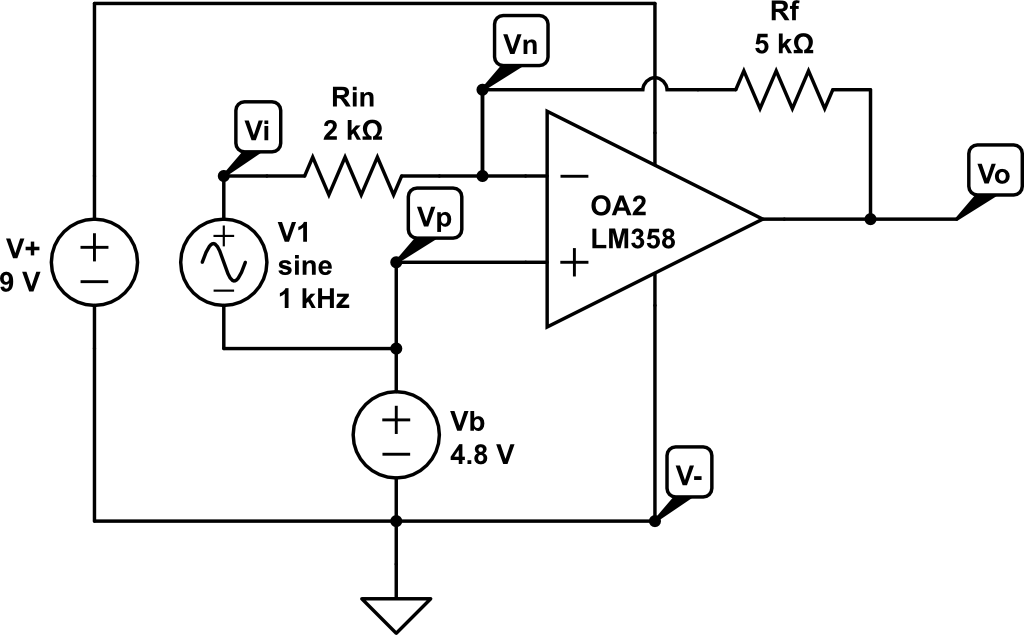
Using the Labrador and a DMM, perform a DC sweep of an inverting amplifier. From our previous lab post we saw the simulation values for a DC Sweep. In this lab, we’ll use the Labrador along with a DMM to determine if our measured values match those of the simulation.
Build the Circuit on a Breadboard
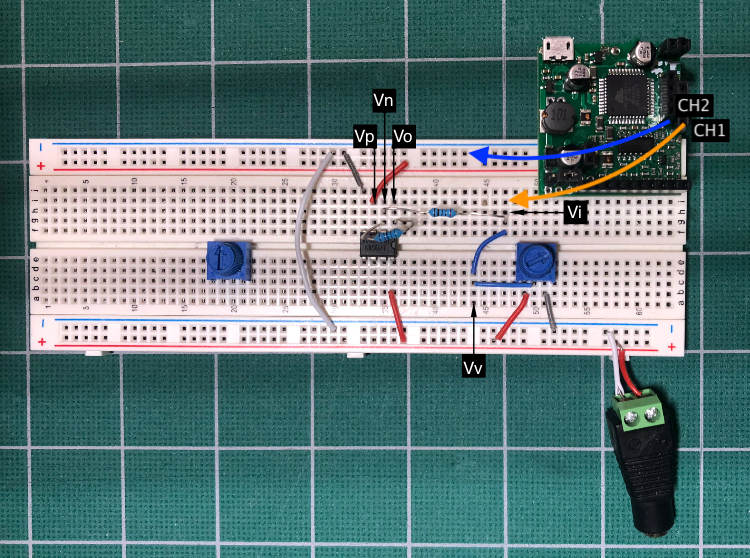
Using this circuit, implement on a breadboard so it is similar to the image below.
Parts List:
LM358 Operational Amplifier
Frequency Generator (Espotek Labrador or ADALM1000)
9V power supply
2k ohm resistor (or 10k potentiometer)
5k ohm resistor (or 10k potentiometer)
Notes:
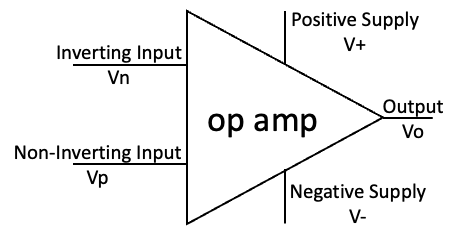
Vo is pin 1 on the chip
Vn is pin 2 on the chip
Vp is pin 3 on the chip
Make sure you attach 9V to pin 8 and Ground to pin 4
Using a Potentiometer as a variable voltage source
Notice the potentiometer on the right on the breadboard. There are three terminals:
How to resolve a possible software bug on the Labrador.
Update August 1, 2021
I’ve noticed that the “Paused” check box appears to “delete the buffer and force a reload”. For example, I might see some clipping on a sine wave and if I check/uncheck Paused, the wave will appear accurately. This would help explain why “checking and unchecking Paused” can fix a multitude of sins. Therefore my new advice is, if your results aren’t what you expect, do the following:
How to install the software then perform a hardware calibration.
The video assumes you have installed the Labrador application and wish to better understand how to do a calibration. It also shows how to solve a multimeter software bug.
Overall Process:
For all of the OS versions; Windows, Linux, macOS, go to the github releases page for the Espotek Labrador and download the appropriate image.
Each OS has its own set of installation instructions, and are very similar to other installations for the same type of software.
Once installed, calibrate and perform the simple test in this presentation to confirm its operating properly
Comments on Installations
Windows
Typical install with multiple click-throughs
Make sure you note where you installed it
Double-click the application to start the application
Linux
Use Appimage version to keep installation simple
Two right-click operations to start the application
macOS
Drag download to Applications folder
Right-click to Open
Click on Open to start the application
Hints for next steps
1. Calibrate the Oscilloscope
To make it easier to connect both wires to USB shield:
Labrador is an all-in-one tool for electronics students, makers and hobbyists. Just plug your Labrador board into a PC (Windows/Mac/Linux), Raspberry Pi or Android device via a MicroUSB cable, load up the software and you instantly have the following engineering tools at your disposal:
As I got back into Forth after about 35 years of other languages, programs and technical stuff, I’ve been asked, Why Forth?
The most personal reason is that I’ve had a life-long passion for the language and kept a bookshelf full of Forth books for over 40 years. However, once I began to use it again, I realized its perfect for embedded processors. I’m surprised how well it works with today’s microcontrollers. And how relatively easy it is to find a port of Forth for many popular microcontrollers. I still think its a good question to ask, so I start this blog with the question:
Here are links to Arduino information, primarily for the Uno and the AVR ATmega328P.
The content on this site is intended to inspire, teach or to simply help with specific topics or concepts using the Arduino Uno. This links on this page are additional resources for a more formal learning as to Arduino framework and the Atmega328P.
Its always helpful to have the Arduino IDE, as one can quickly test a board or run a C++ routine to determine if they are doing the right thing in Forth (yes, this is cheating)
Here are links to Forth tutorials, books or products.
The content on this site is intended to inspire, teach or to simply help with specific topics or concepts in Forth. This page provides a list of resources for a more formal learning as to Forth. Many of the people that have created the content below have been writing or teaching Forth for many years, they are the experts.
Check the version number on avr-gdb as of December 2021, it is 11.1. On Ubuntu, the latest version is 8.1 from 2018 which had quite a few bugs. Attempted to build it manually (which failed), so I spun up a Manjaro (Arch Linux) instance to get the latest. Crazy, I know.
Start avarice in a separate window using, then launch gdb in another window: