
Where I describe the process of developing code for the Arduino Uno(AVR ATmega328P), specifically, the build process.
Introduction (from Edit)#
The middle three steps compile/link/locate are typically called the build process, which can simplify the five steps to three:
- Edit
- Build
- Upload
For a detailed and very worthwhile description of the three steps in Build, I highly recommend this page, Compiling, Link and Locating: Barr Group.
2. Build (compile/link/locate)#
The image is a typical start-up build sequence, I need to cd three times, to get into the specific folder. Once there, I use make clean to ensure I have a clean start (source code and makefile only) then I execute a make flash.
Important for a successful build#
-
The source file must be named main.c. If not, you might see “undefined reference to ‘main’”
-
You must be in the same folder as the makefile and the main.c file to execute the make command. If not, you will see “make: No targets specified and no makefile found. Stop.”
-
You must use one of the target make commands (see Make Commands below). If not, you will see “make: ** No rule to make target ‘dlash’. Stop.”*. In this case, I mis-spelled flash to dlash.
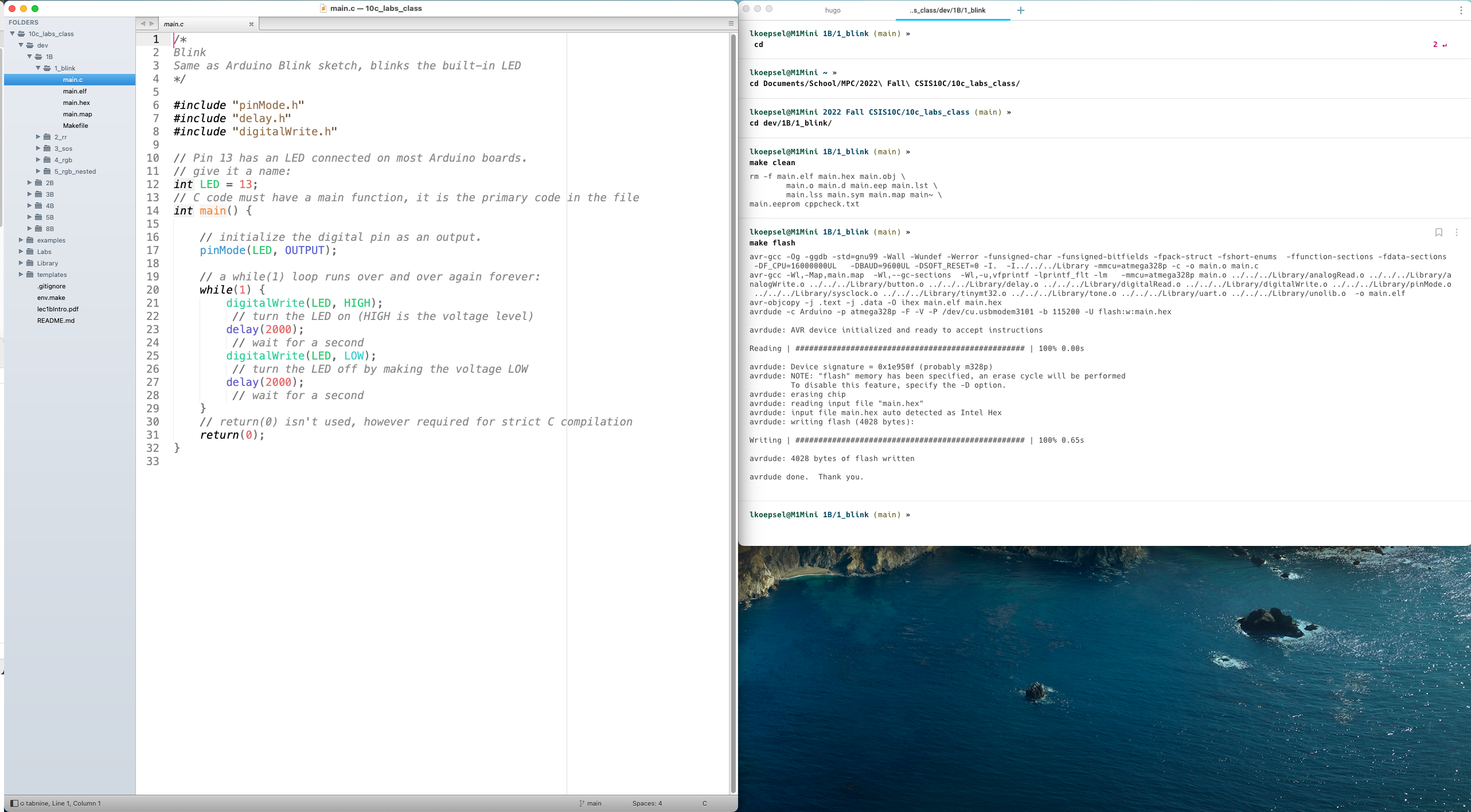
Typical Build Screen
Compile Error: “expected identifier”#
This error was identified in this video.
|
|
Originally, I thought I hadn’t included the AVR-GCC header for integer types called stdint.h, however, in the video its clear that is not the solution. Upon better inspection, I looked at the first error (line 3) and realized the first line in the program, which was meant to be a comment, was missing a “/”. Once the line was made back into a comment, the compile was error free. The errors in lines 10 and 13 were incorrect and were not errors!.
Simple Solution#
Always look at the first error before attempting to solve the later errors. Its not unusual for the first error to cause false positive errors, later on.
Compile Error: “implicit declaration”#
The error in this video is an “implicit declaration”, it happens quite frequently as it is caused by not adding the header file for a function used in the program.
Simple Explanation#
The easiest way to to solve the implicit declaration error, is to include the correct header file. For a vast majority of the AVR_C functions, it will be the name of the function followed by a .h. For example:
make flash
avr-gcc -Og -ggdb -std=gnu99 -Wall -Wundef -Werror -funsigned-char -funsigned-bitfields -fpack-struct -fshort-enums  -ffunction-sections -fdata-sections  -DF_CPU=16000000UL   -DBAUD=9600UL -DSOFT_RESET=0 -I.  -I../../../Library -mmcu=atmega328p -c -o main.o main.c
main.c: In function 'main':
main.c:20:9: error: implicit declaration of function 'digitalWrite' [-Werror=implicit-function-declaration]
   20 |         digitalWrite(LED, HIGH);
      |         ^~~~~~~~~~~~
cc1: all warnings being treated as errors
make: *** [main.o] Error 1
In the code editor, you see the following headers included:
#include "pinMode.h"
#include "delay.h"
And if you add a third header for the digitalWrite function:
#include "digitalWrite.h"You will have these results:
make flash
avr-gcc -Og -ggdb -std=gnu99 -Wall -Wundef -Werror -funsigned-char -funsigned-bitfields -fpack-struct -fshort-enums  -ffunction-sections -fdata-sections  -DF_CPU=16000000UL   -DBAUD=9600UL -DSOFT_RESET=0 -I.  -I../../../Library -mmcu=atmega328p -c -o main.o main.c
avr-gcc -Wl,-Map,main.map  -Wl,--gc-sections  -Wl,-u,vfprintf -lprintf_flt -lm   -mmcu=atmega328p main.o ../../../Library/analogRead.o ../../../Library/analogWrite.o ../../../Library/button.o ../../../Library/delay.o ../../../Library/digitalRead.o ../../../Library/digitalWrite.o ../../../Library/pinMode.o ../../../Library/sysclock.o ../../../Library/tinymt32.o ../../../Library/tone.o ../../../Library/uart.o ../../../Library/unolib.o  -o main.elf
avr-objcopy -j .text -j .data -O ihex main.elf main.hex
avrdude -c Arduino -p atmega328p -F -V -P /dev/cu.usbmodem3101 -b 115200 -U flash:w:main.hex

avrdude: AVR device initialized and ready to accept instructions

Reading | ################################################## | 100% 0.00s

avrdude: Device signature = 0x1e950f (probably m328p)
avrdude: NOTE: "flash" memory has been specified, an erase cycle will be performed
         To disable this feature, specify the -D option.
avrdude: erasing chip
avrdude: reading input file "main.hex"
avrdude: input file main.hex auto detected as Intel Hex
avrdude: writing flash (4028 bytes):

Writing | ################################################## | 100% 0.65s

avrdude: 4028 bytes of flash written

avrdude done.  Thank you.
Make Commands#
The Makefile in each folder has a variety of options which can be quite useful. Here are a few of them:
# Same as Verify in Arduino IDE, simply compiles the main.c program
make
# Same as Upload in Arduino IDE, compiles, links and uploads the code to the UNO
make flash
# Create a an assembly listing of the code complete with C source code
make disassembly
# Show the size of the code created in great detail
make size
# Remove all files except source files (main.c and Makefile)
make all_clean
# Remove all the current object files in the Library
make LIB_clean